LIMINAL

An atmospheric soundtrack exploring the eerie, nostalgic essence of transitional environments.

OUT NOW

JIMMY SVENSSON

Composer of electronic and experimental music

New Music

Latest Release

Liminal - Album Art
2026

LIMINAL

EP - 2026

Jimmy Svensson returns with Liminal, a five-song EP that drifts through the eerie, nostalgic atmosphere of transitional spaces. Built as an atmospheric soundtrack, the release explores fluorescent corridors, tiled echoes, and uncanny passages between the familiar and the unknown.

Across tracks including “Fluorescent Halls,” “Service Corridor,” and the nearly nine-minute title piece, he continues his exploration of electronic and experimental sound, moving between ambient tension and dark cinematic textures.

Discography

A Solitary Thought

Single - 2026

Mnemonic Residue

Single - 2026

The Quiet Expanse

Single - 2026

A Brief Memo On Nothing At All

Single - 2026

Ableton Extensions

JS Drum Rack Splitter - Ableton Extension JS Drum Rack Splitter - Ableton Extension

JS Drum Rack Splitter

JS Drum Rack Splitter is an Ableton Live Extension for turning a Drum Rack track into separate tracks for mixing, editing, arranging, exporting, or further sound design.

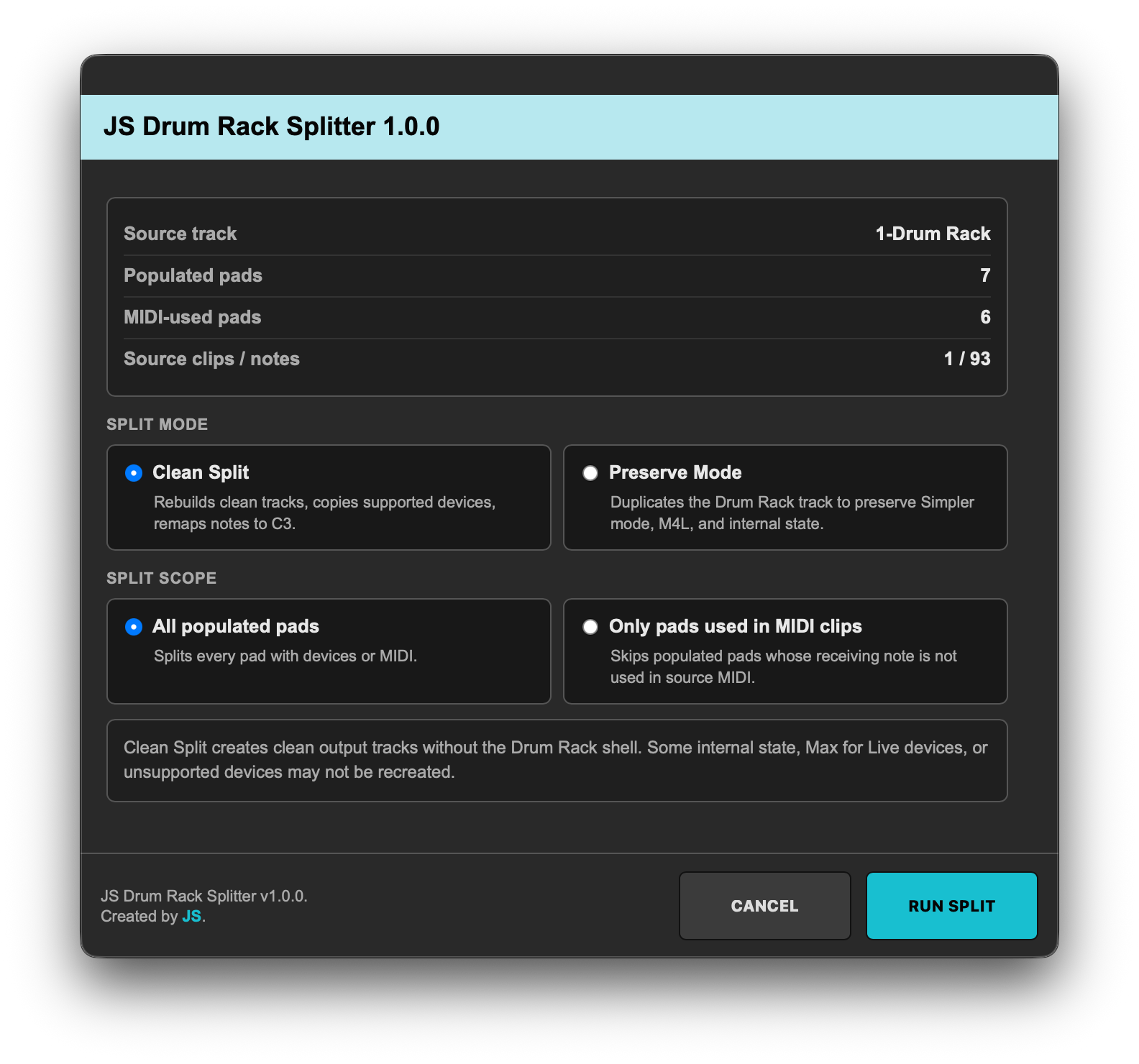
The workflow is simple: right-click a Drum Rack track, launch JS Drum Rack Splitter, choose how you want to split it, and let the extension create the output tracks. The original source track is left untouched.

Clean Split creates clean individual MIDI tracks for each Drum Rack pad. It rebuilds supported devices, copies parameters, splits MIDI clips, and remaps notes to C3 for standalone Simpler playback.

Preserve Mode duplicates the original Drum Rack track per pad or pad group, preserving Simpler modes, Max for Live devices, effects, and internal device state. This mode is useful when you want to keep the original rack behavior as intact as possible while still separating the material into new tracks.

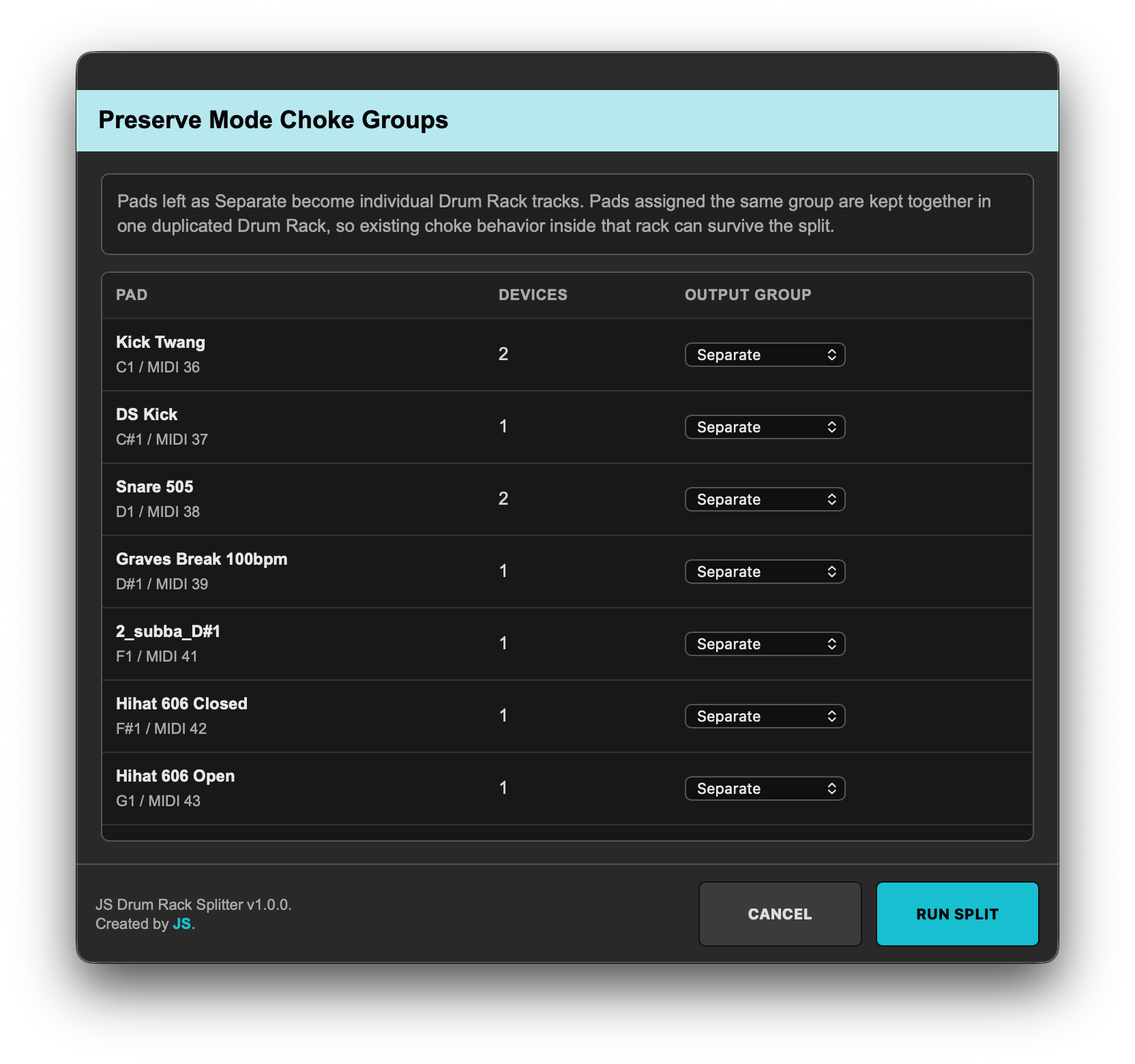
Preserve Mode also includes a manual Choke Groups step. Pads assigned to the same output group are kept together in one duplicated Drum Rack, so related pads such as open and closed hi-hats can preserve their existing Drum Rack choke behavior after the split.

You can choose to split all populated pads or only pads that are actually used in MIDI clips. Output tracks are created in natural pad order from low to high MIDI notes, making the result easy to navigate and ready for mixing, editing, arranging, exporting, or further sound design.

Features

  • Split a Drum Rack track into separate output tracks
  • Designed for mixing, editing, arranging, exporting and sound design
  • Simple right-click workflow from an Ableton Live Drum Rack track
  • Clean Split mode for clean individual MIDI tracks
  • Rebuilds supported devices in Clean Split mode
  • Copies supported device parameters
  • Splits MIDI clips per Drum Rack pad
  • Remaps notes to C3 for standalone Simpler playback
  • Preserve Mode for duplicating the original Drum Rack track
  • Preserves Simpler modes, effects, Max for Live devices and internal device state
  • Manual Choke Groups step in Preserve Mode
  • Keep related pads together, such as open and closed hi-hats
  • Choose between all populated pads or only pads used in MIDI clips
  • Source track is left untouched
  • Natural pad and track order from low to high MIDI notes
  • Result screen after splitting

Current version: 1.0.0

Please note that this Ableton Extension was created using the Ableton Extensions SDK and requires a compatible version of Ableton Live.

JS Loop Collage - Ableton Extension

JS Loop Collage

JS Loop Collage is an Ableton Live Extension that generates entirely new audio loops from the audio already contained in your project.

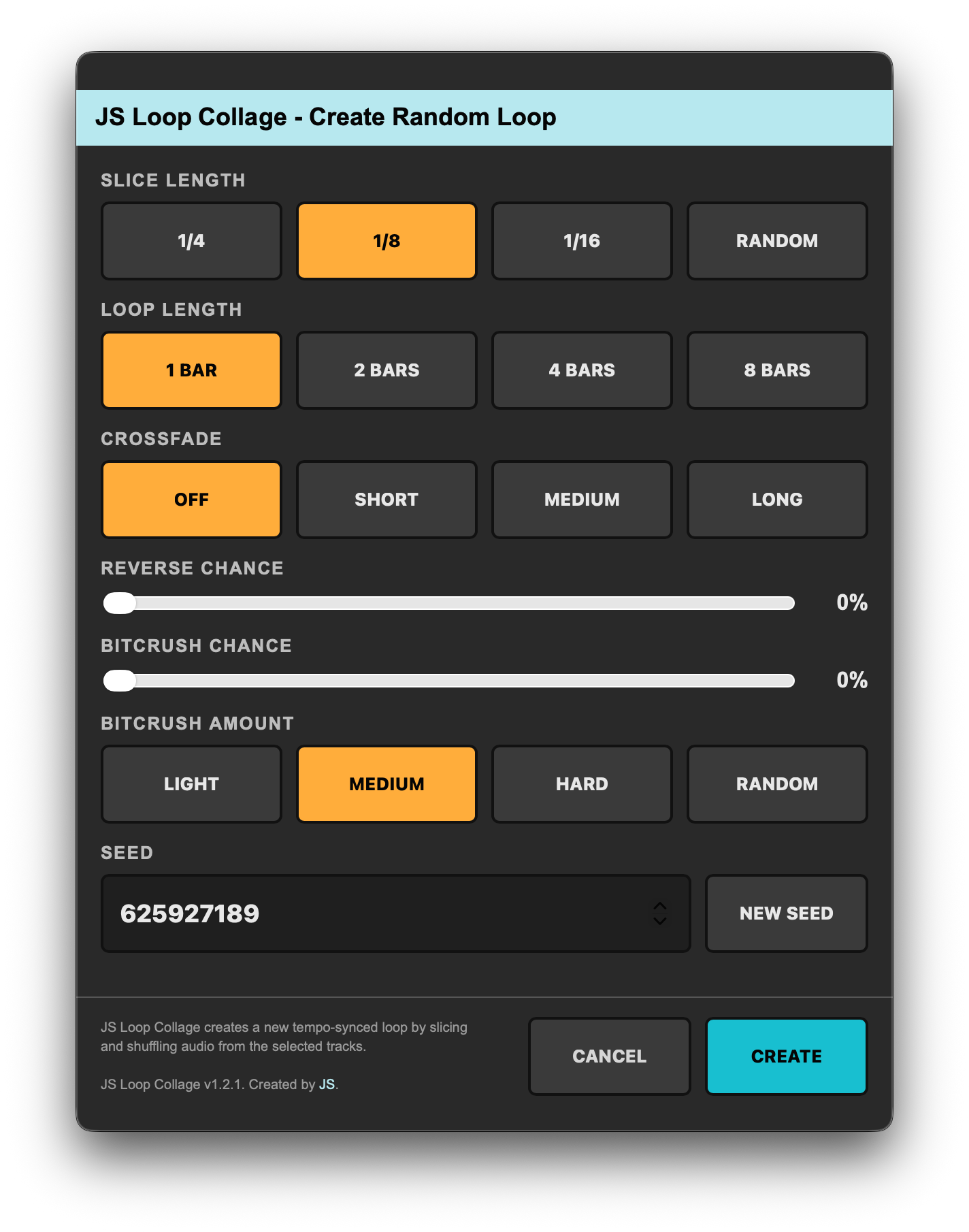
Simply select a time range across one or more audio tracks, launch JS Loop Collage, and choose a loop length, slice size, crossfade mode, reverse probability, bitcrush settings, and seed value. The extension renders the selected audio, extracts tempo-synced snippets, randomizes their order, and assembles them into a brand new loop.

Choose fixed slice lengths (1/4, 1/8 or 1/16 notes) or use Random mode, which combines different slice sizes while maintaining perfect synchronization to the project tempo and selected loop length. Crossfade modes make it possible to create smoother transitions for pads, drones and ambient material.

Reverse Chance allows you to introduce reversed snippets, while Bitcrush Chance and Bitcrush Amount let you randomly apply lo-fi processing to individual snippets. This allows clean, reversed and processed audio to coexist within the same generated loop.

JS Loop Collage then renders a 48 kHz / 24-bit WAV file and automatically imports it into your Live Set as a standard audio clip.

Features

  • Generate entirely new loops from existing project audio
  • Tempo-synced slicing and reconstruction
  • Fixed slice lengths: 1/4, 1/8 or 1/16 notes
  • Random slice mode with mixed rhythmic divisions
  • Loop lengths of 1, 2, 4 or 8 bars
  • Crossfade modes: Off, Short, Medium and Long
  • Smoother loop generation from pads, drones and ambient material
  • Reverse Chance control (0–100%)
  • Bitcrush Chance control (0–100%)
  • Bitcrush Amount modes: Light, Medium, Hard and Random
  • Seed support for reproducible results
  • Improved source distribution across selected tracks
  • Automatic detection of audible source material
  • AIFF and WAV source support
  • 48 kHz / 24-bit WAV rendering
  • Direct import into Arrangement View

Current version: 1.2.1

Please note that this Ableton Extension was created using Ableton Extensions SDK v1.0.0 and only works with Live 12.4.5b3 and above.

JS Sweeper - Ableton Extension

JS Sweeper

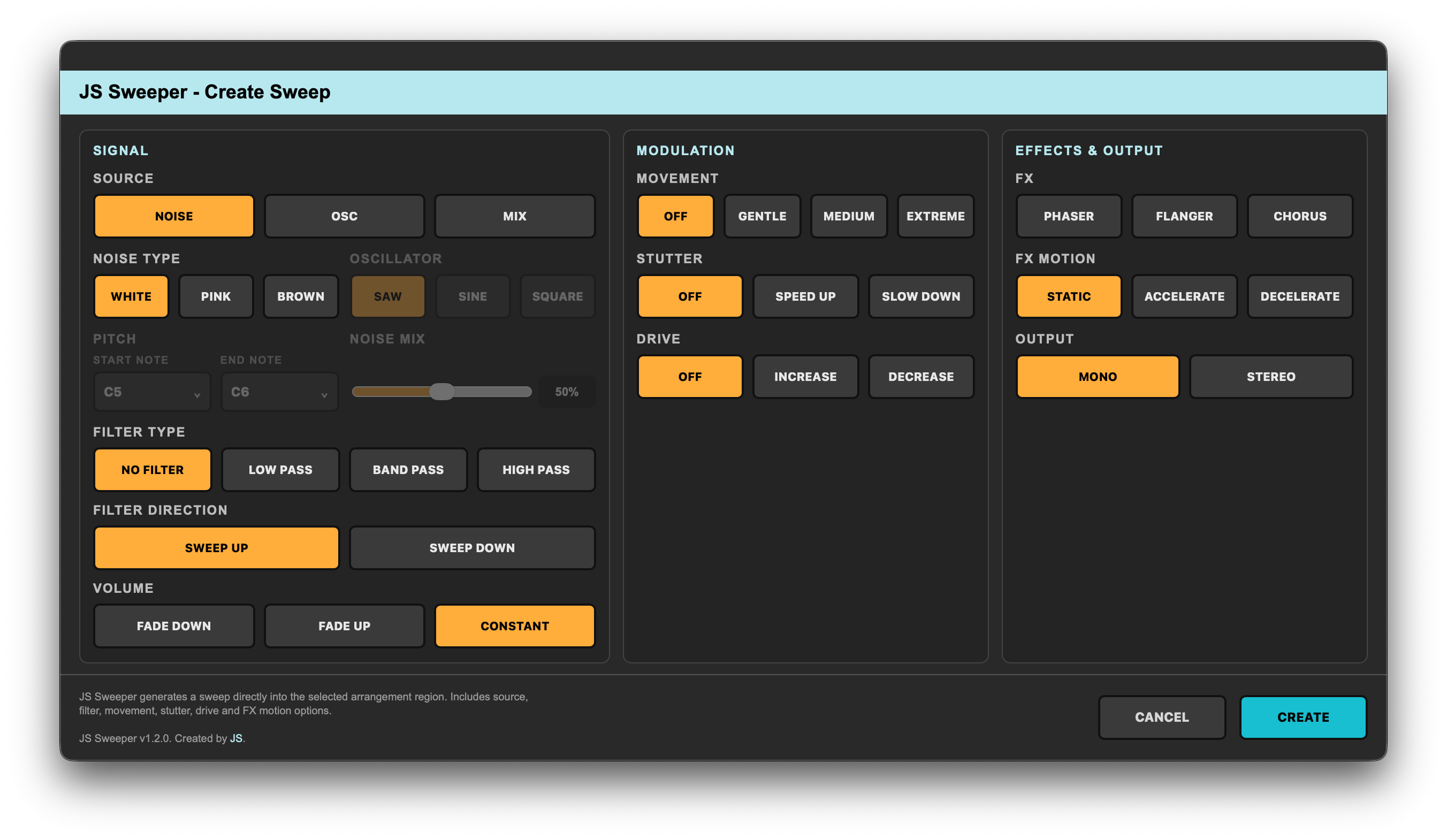
JS Sweeper is an Ableton Live Extension that generates custom sweeps directly inside your project.

Simply select a time range on an audio track, launch JS Sweeper, and choose between noise-based sweeps, oscillator-based risers or a blend of both. The extension then generates a fully rendered sweep that matches the length of your selection.

Choose from White, Pink or Brown noise, Saw, Sine or Square oscillators, configurable pitch sweeps, adjustable noise/oscillator blending, filter sweeps, movement modulation, stutter effects, drive processing, phaser, flanger and chorus effects.

Stereo mode adds subtle channel variations and modulation offsets to create a wider and more spacious sound, while automatic normalization ensures consistent output levels regardless of the selected settings.

JS Sweeper then renders a 48 kHz / 24-bit WAV file and automatically imports it into your Live Set as a standard audio clip.

Features

  • Generate sweeps directly inside Ableton Live
  • Create sweeps of any duration based on the selected Arrangement region
  • Noise, Oscillator or Mix source modes
  • White, Pink and Brown noise generation
  • Saw, Sine and Square oscillator waveforms
  • Configurable pitch sweeps with selectable start and end notes
  • Adjustable noise / oscillator blend
  • Low Pass, Band Pass, High Pass or No Filter modes
  • Upward and downward filter sweeps
  • Fade Up, Fade Down or Constant volume modes
  • Movement modulation: Off, Gentle, Medium and Extreme
  • Stutter modes: Off, Speed Up and Slow Down
  • Drive modes: Off, Increase and Decrease
  • Phaser, Flanger and Chorus effects
  • FX Motion modes: Static, Accelerate and Decelerate
  • Mono and Stereo output
  • Automatic output normalization
  • Automatic clip and file naming
  • 48 kHz / 24-bit WAV rendering
  • Direct import into Arrangement View

Current version: 1.2.0

Please note that this Ableton Extension was created using Ableton Extensions SDK v1.0.0 and only works with Live 12.4.5b3 and above.
JS Operator Randomizer - Ableton Extension

JS Operator Randomizer

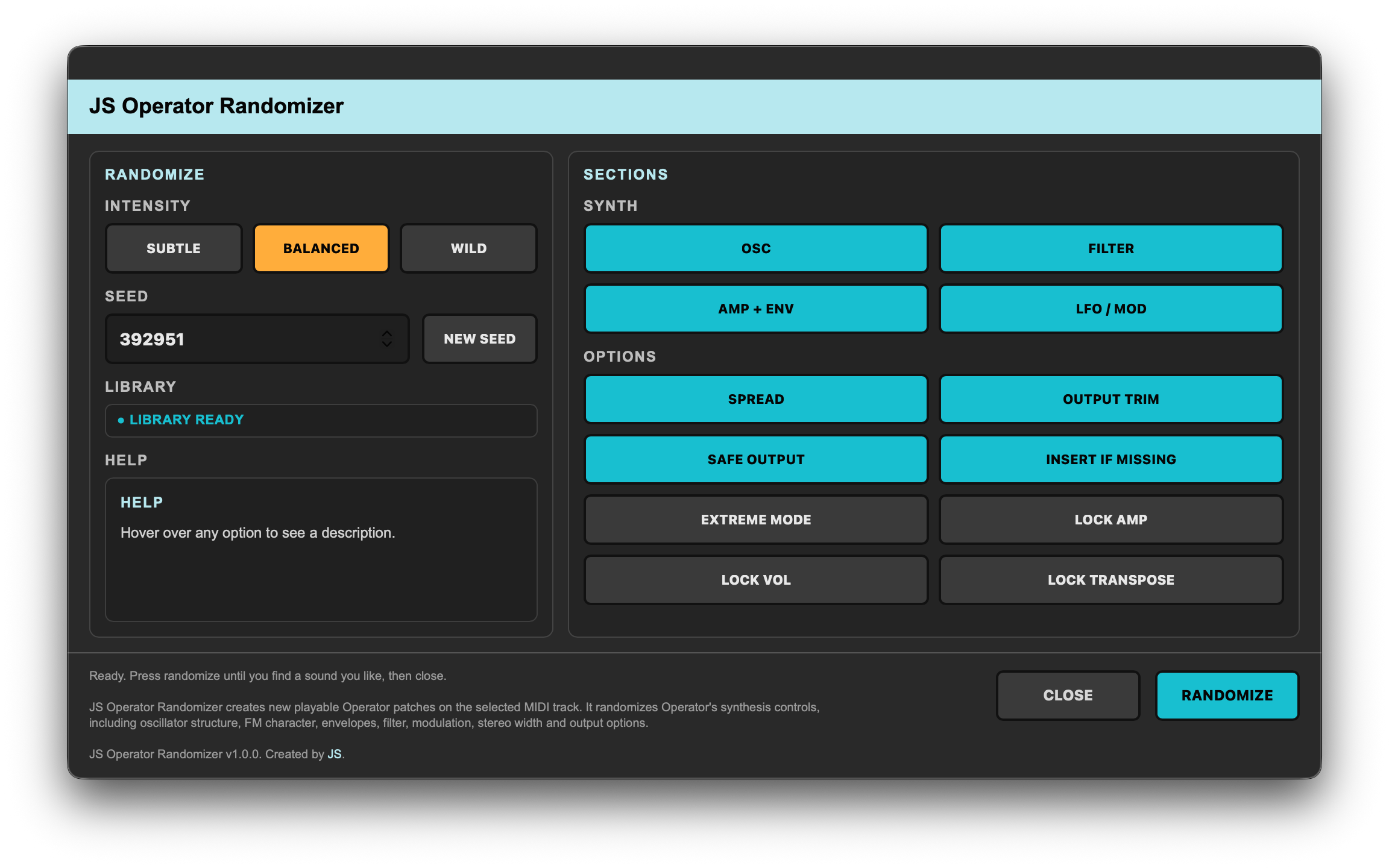
JS Operator Randomizer is an Ableton Live Extension that generates entirely new sounds for Ableton's Operator synthesizer.

Simply place an Operator device on a MIDI track, launch JS Operator Randomizer, choose an intensity mode, optional sound design settings and a seed value, then generate a completely new patch with a single click.

The extension randomizes Operator’s synthesis engine, including oscillator structure, FM algorithms, waveforms, envelopes, filters, modulation sources, stereo characteristics and output settings. Unlike preset browsers, JS Operator Randomizer creates entirely new sounds rather than selecting from an existing preset library.

Three intensity modes allow you to control how far the generated sound can deviate from its starting point. Subtle creates smaller variations, Balanced generates broader musical changes, and Wild explores more experimental territory.

Additional controls make it possible to lock volume envelopes, output volume and transpose settings while still randomizing the rest of the synthesizer. Safe Output mode helps prevent extremely loud or extremely quiet results, while Extreme Mode removes some of the safety limits and allows more aggressive FM structures, feedback amounts and modulation routings.

If no Operator device is present on the selected MIDI track, JS Operator Randomizer can automatically insert a new Operator instance before generating a sound.

Every generated sound is based on a reproducible seed value. Using the same seed and settings will always recreate the same result.

During sound generation, the extension window temporarily closes while Operator parameters are updated inside Live. Once the randomization process is complete, the window automatically reopens with your previous settings preserved, allowing you to quickly generate and audition multiple sounds without reopening the extension manually.

Features

  • Generate entirely new Operator sounds
  • Three intensity modes: Subtle, Balanced and Wild
  • Seed support for reproducible results
  • Oscillator and waveform randomization
  • FM algorithm randomization
  • Filter randomization
  • Envelope randomization
  • LFO and modulation randomization
  • Stereo spread randomization
  • Safe Output mode
  • Extreme Mode
  • Lock Amp option
  • Lock Vol option
  • Lock Transpose option
  • Automatic Operator insertion when missing
  • Persistent randomization window for rapid sound browsing

Warning! Extreme Mode may occasionally generate unusual, highly resonant or experimental sounds. While Safe Output mode attempts to maintain reasonable levels, users should monitor output levels when exploring aggressive settings.

JS Operator Randomizer only works with Ableton's Operator synthesizer and does not support third-party instruments.

Current version: 1.0.0

Please note that this Ableton Extension was created using Ableton Extensions SDK v1.0.0 and only works with Live 12.4.5b3 and above.
Jimmy Svensson - Artist Photo
Jimmy Svensson

About

Jimmy Svensson is a composer of electronic and experimental music.

His music has been featured on Netflix, DR, SVT, NRK and YLE amongst others, bringing his signature sound to audiences worldwide. From contemplative ambient pieces to dark, industrial soundscapes, each release explores its own sonic territory.

With over 30 releases spanning ambient, dark ambient, experimental, and electronic genres, Jimmy experiments across a diverse range of sonic territories, exploring the space between emotion and sound.

1.2M+

Streams

30+

Releases